

How to create a Life Book?

How to create a Life Book ?
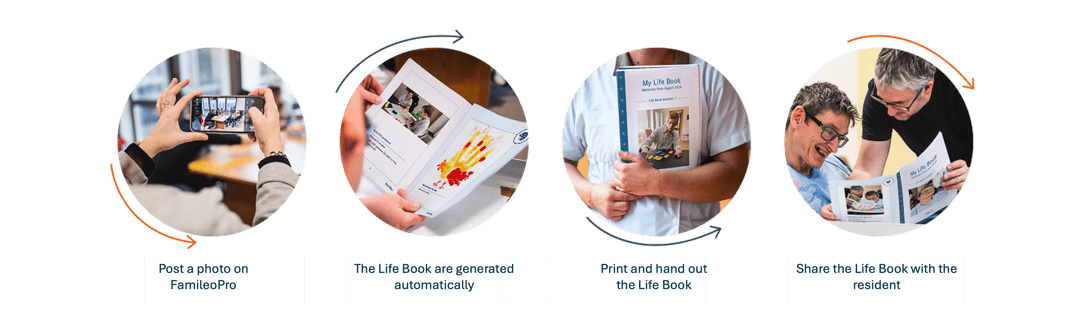
Send personal messages from a computer, or directly from the FamileoPro app on your phone. Life Books are generated automatically on the last Friday of every month, from the messages published.
Take a look at our dedicated tutorial on sending personal messages.
Once a Life Book has been produced, the first personal message published afterwards will be used as the cover page for the next one.
How often are Life Books generated ?
How often are Life Books generated ?
Life Books are generated on the last Friday of every month, to create a regular moment of connection with the person you care for. If you'd like to change this frequency, just get in touch with your Famileo Pro contact or our customer support team.
Life Books can be generated weekly, every two weeks, or monthly.
Don't hesitate to reach out so your Famileo Pro contact can make the necessary changes for you.
How to find Life Books ?
How to find Life Books ?
Once you've posted personal messages, you'll be able to print the Life Books that are automatically generated every last Friday of the month.
You'll find the latest Life Books for the current month right on the homepage.
Print all of the month's Life Books in one go from the printing page.
Access the full history of Life Books for each resident: search for their name in the list, then click "See their Life Books" next to it. You'll have access to all their Life books and can reprint them whenever you like.
Click here to find out more about printing.
How to print Life Books ?
How to print Life Books ?
Once the Life Books are saved on your computer, open the file using Acrobat Reader.
Open your printer's print settings and choose the following options for A3-format Life books: Double-sided printing - Landscape orientation; Flip on short edge; Colour.
For A4-format Life Books, no special settings are needed.
A3 and A4 Life Books can have a different number of pages, depending on how many messages were published. Be sure to print both formats — they're not the same file!
Can Life Books be personalised for each resident ?
Can Life Books be personalised for each resident?
You can personalise the covers of Life Books by changing the design border on the left-hand side of the cover. This adds a touch of colour to the Life Books, and also helps residents keep track of time thanks to Famileo Pro's seasonal themes. These seasonal themes provide simple visual cues to make it easier to recognise different times of the year.
What's the difference between the Life Book and the Gazette ?
What's the difference between the Life Book
and the Gazette?
The Gazette: a mediation tool for care staff
It helps build a more personal connection with each resident and get to know their loved ones and their life story, through the messages their family shares. Families can naturally look back on shared moments with their loved one by posting photos that reflect things like their interests.
The Life Book: a support tool for the person in your care
It brings together all of a resident's life moments and shared experiences within your facility, through the photos you post. A genuine paper keepsake made just for them, helping to celebrate their personal identity every day. It's also a real educational tool — encouraging exchanges, stimulating memory, and reducing feelings of isolation, even without family contact.
/02_Centre%20de%20ressources/02_EN/01_TUTOS%20EN/08_User%20guide%20Life%20book/UK%20-%20gazette%20vs%20life%20book.png?width=554&height=352&name=UK%20-%20gazette%20vs%20life%20book.png)
Is the Life Book a good fit for the people you support ?
Is the Life Book a good fit for the people you support ?
The Life Book can be used in different ways, depending on each person's needs, abilities and habits. There's no single right way to use it — what matters is adapting it to suit them best.
For someone able to take part in creating their Life Book, you can write the messages together with them, using the first person "I" so they can recognise themselves more easily in their memories and feel that the book is truly theirs.
For someone who relates mainly through images, the Life Book can become a way to connect around photos, helping them read or understand the messages whenever needed.
Above all, the Life Book is a moment to share — a way to connect, and to remember.


.png?width=20&height=28&name=MicrosoftTeams-image%20(1).png "MicrosoftTeams-image (1)")